Reference version

模态底部弹出层

一个用于从屏幕底部展示内容的 Jetpack Compose ModalBottomSheet 组件。

Android
Included in Expo Go
Bundled version:
~56.0.6

For the complete documentation index, see llms.txt. Use this file to discover all available pages.

有关跨平台用法,请参阅通用的 BottomSheet — 它会针对不同平台渲染相应的原生组件。

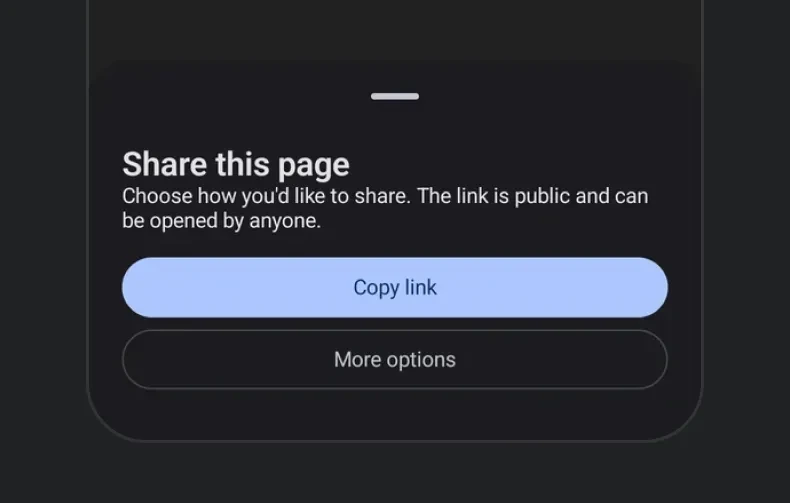
Expo UI ModalBottomSheet 与官方 Jetpack Compose Bottom Sheet API 保持一致,并以从底部滑出的模态抽屉形式显示内容。

Modal bottom sheet with title, description, and action buttons

安装

Terminal
npx expo install @expo/ui

If you are installing this in an existing React Native app, make sure to install expo in your project.

用法

基础底部抽屉

在卸载组件之前,使用 ref.hide() 通过动画以编程方式关闭抽屉。

BasicBottomSheetExample.tsx
import { useRef, useState } from 'react'; import { Host, ModalBottomSheet, Button, Column, Text } from '@expo/ui/jetpack-compose'; import type { ModalBottomSheetRef } from '@expo/ui/jetpack-compose'; import { paddingAll } from '@expo/ui/jetpack-compose/modifiers'; export default function BasicBottomSheetExample() { const [visible, setVisible] = useState(false); const sheetRef = useRef<ModalBottomSheetRef>(null); const hideSheet = async () => { await sheetRef.current?.hide(); setVisible(false); }; return ( <Host matchContents> <Button onClick={() => setVisible(true)}> <Text>Open Sheet</Text> </Button> {visible && ( <ModalBottomSheet ref={sheetRef} onDismissRequest={() => setVisible(false)}> <Column verticalArrangement={{ spacedBy: 12 }} modifiers={[paddingAll(24)]}> <Text>来自底部抽屉的问候!</Text> <Text>你可以在这里添加更多内容。</Text> <Button onClick={hideSheet}> <Text>关闭</Text> </Button> </Column> </ModalBottomSheet> )} </Host> ); }

跳过部分展开状态

当设置了 skipPartiallyExpanded 时,抽屉会直接以完全展开状态打开,而不是先停在半高位置。

SkipPartiallyExpandedExample.tsx
import { useRef, useState } from 'react'; import { Host, ModalBottomSheet, Button, Column, Text } from '@expo/ui/jetpack-compose'; import type { ModalBottomSheetRef } from '@expo/ui/jetpack-compose'; import { paddingAll } from '@expo/ui/jetpack-compose/modifiers'; export default function SkipPartiallyExpandedExample() { const [visible, setVisible] = useState(false); const sheetRef = useRef<ModalBottomSheetRef>(null); const hideSheet = async () => { await sheetRef.current?.hide(); setVisible(false); }; return ( <Host matchContents> <Button onClick={() => setVisible(true)}> <Text>Open Sheet</Text> </Button> {visible && ( <ModalBottomSheet ref={sheetRef} onDismissRequest={() => setVisible(false)} skipPartiallyExpanded> <Column verticalArrangement={{ spacedBy: 12 }} modifiers={[paddingAll(24)]}> <Text>这个抽屉会跳过部分展开状态。</Text> <Text>它会直接以完全展开的位置打开。</Text> <Button onClick={hideSheet}> <Text>关闭</Text> </Button> </Column> </ModalBottomSheet> )} </Host> ); }

自定义颜色

使用 containerColorcontentColorscrimColor 自定义抽屉外观。

CustomColorsExample.tsx
import { useRef, useState } from 'react'; import { Host, ModalBottomSheet, Button, Column, Text } from '@expo/ui/jetpack-compose'; import type { ModalBottomSheetRef } from '@expo/ui/jetpack-compose'; import { paddingAll } from '@expo/ui/jetpack-compose/modifiers'; export default function CustomColorsExample() { const [visible, setVisible] = useState(false); const sheetRef = useRef<ModalBottomSheetRef>(null); const hideSheet = async () => { await sheetRef.current?.hide(); setVisible(false); }; return ( <Host matchContents> <Button onClick={() => setVisible(true)}> <Text>Open Colored Sheet</Text> </Button> {visible && ( <ModalBottomSheet ref={sheetRef} onDismissRequest={() => setVisible(false)} containerColor="#1a1a2e" contentColor="#e0e0e0" scrimColor="#806200EE"> <Column verticalArrangement={{ spacedBy: 12 }} modifiers={[paddingAll(24)]}> <Text>自定义样式的底部抽屉。</Text> <Text>深色容器配合紫色遮罩层。</Text> <Button onClick={hideSheet}> <Text>关闭</Text> </Button> </Column> </ModalBottomSheet> )} </Host> ); }

自定义拖拽把手

使用 ModalBottomSheet.DragHandle 插槽提供自定义拖拽把手,或者设置 showDragHandle={false} 将其完全隐藏。

CustomDragHandleExample.tsx
import { useRef, useState } from 'react'; import { Host, ModalBottomSheet, Button, Column, Box, Text } from '@expo/ui/jetpack-compose'; import type { ModalBottomSheetRef } from '@expo/ui/jetpack-compose'; import { background, clip, fillMaxWidth, height, padding, Shapes, width, } from '@expo/ui/jetpack-compose/modifiers'; export default function CustomDragHandleExample() { const [visible, setVisible] = useState(false); const sheetRef = useRef<ModalBottomSheetRef>(null); const hideSheet = async () => { await sheetRef.current?.hide(); setVisible(false); }; return ( <Host matchContents> <Button onClick={() => setVisible(true)}> <Text>Open Custom Handle Sheet</Text> </Button> {visible && ( <ModalBottomSheet ref={sheetRef} onDismissRequest={() => setVisible(false)}> <ModalBottomSheet.DragHandle> <Column horizontalAlignment="center" modifiers={[fillMaxWidth(), padding(0, 12, 0, 8)]}> <Box modifiers={[width(60), height(6), clip(Shapes.Circle), background('#6200EE')]} /> </Column> </ModalBottomSheet.DragHandle> <Column verticalArrangement={{ spacedBy: 12 }} modifiers={[padding(16, 16, 16, 16)]}> <Button onClick={hideSheet}> <Text>关闭</Text> </Button> </Column> </ModalBottomSheet> )} </Host> ); }

底部抽屉中的 React Native 内容

使用 RNHostView 在 Compose 底部抽屉中嵌入可交互的 React Native 视图。这使你可以将 Compose 布局与 PressableText 等 RN 组件混合使用。

RNContentBottomSheetExample.tsx
import { useRef, useState } from 'react'; import { Host, ModalBottomSheet, Button, Column, RNHostView, Text } from '@expo/ui/jetpack-compose'; import type { ModalBottomSheetRef } from '@expo/ui/jetpack-compose'; import { padding } from '@expo/ui/jetpack-compose/modifiers'; import { Pressable, Text as RNText, View } from 'react-native'; export default function RNContentBottomSheetExample() { const [visible, setVisible] = useState(false); const sheetRef = useRef<ModalBottomSheetRef>(null); const hideSheet = async () => { await sheetRef.current?.hide(); setVisible(false); }; return ( <Host matchContents> <Button onClick={() => setVisible(true)}> <Text>Open RN Content Sheet</Text> </Button> {visible && ( <ModalBottomSheet ref={sheetRef} onDismissRequest={() => setVisible(false)} skipPartiallyExpanded={false}> <Column verticalArrangement={{ spacedBy: 16 }} modifiers={[padding(16, 16, 16, 16)]}> <Text>在底部抽屉中混合使用 Compose + RN</Text> <RNHostView matchContents> <View> <RNText style={{ fontSize: 18, fontWeight: 'bold', marginBottom: 8 }}> React Native 内容 </RNText> <Pressable style={{ backgroundColor: '#007AFF', padding: 12, borderRadius: 8, alignItems: 'center', }} onPress={hideSheet}> <RNText style={{ color: 'white', fontWeight: '600' }}>关闭</RNText> </Pressable> </View> </RNHostView> </Column> </ModalBottomSheet> )} </Host> ); }

带 flex 的 React Native 内容

不使用 matchContentsRNHostView 可以让 RN 视图填满抽屉内剩余空间。与父级 Column 上固定的 height 修饰符配合使用,以控制抽屉大小。

FlexRNContentExample.tsx
import { useRef, useState } from 'react'; import { Host, ModalBottomSheet, Button, Column, RNHostView, Text } from '@expo/ui/jetpack-compose'; import type { ModalBottomSheetRef } from '@expo/ui/jetpack-compose'; import { height, padding } from '@expo/ui/jetpack-compose/modifiers'; import { Text as RNText, View } from 'react-native'; export default function FlexRNContentExample() { const [visible, setVisible] = useState(false); const sheetRef = useRef<ModalBottomSheetRef>(null); const hideSheet = async () => { await sheetRef.current?.hide(); setVisible(false); }; return ( <Host matchContents> <Button onClick={() => setVisible(true)}> <Text>Open Flex Content Sheet</Text> </Button> {visible && ( <ModalBottomSheet ref={sheetRef} onDismissRequest={() => setVisible(false)} skipPartiallyExpanded> <Column modifiers={[height(400), padding(16, 16, 16, 16)]}> <Text>具有 flex: 1 的 RN 视图</Text> <RNHostView> <View style={{ flex: 1, backgroundColor: '#9B59B6', borderRadius: 10 }}> <RNText style={{ color: 'white', fontSize: 18, fontWeight: 'bold', padding: 16, }}> React Native 内容(flex: 1) </RNText> </View> </RNHostView> </Column> </ModalBottomSheet> )} </Host> ); }

不可关闭的抽屉

结合 propertiessheetGesturesEnabled 创建一个只能通过编程方式关闭的抽屉。

NonDismissibleExample.tsx
import { useRef, useState } from 'react'; import { Host, ModalBottomSheet, Button, Column, Text } from '@expo/ui/jetpack-compose'; import type { ModalBottomSheetRef } from '@expo/ui/jetpack-compose'; import { paddingAll } from '@expo/ui/jetpack-compose/modifiers'; export default function NonDismissibleExample() { const [visible, setVisible] = useState(false); const sheetRef = useRef<ModalBottomSheetRef>(null); const hideSheet = async () => { await sheetRef.current?.hide(); setVisible(false); }; return ( <Host matchContents> <Button onClick={() => setVisible(true)}> <Text>Open Non-Dismissible Sheet</Text> </Button> {visible && ( <ModalBottomSheet ref={sheetRef} onDismissRequest={() => setVisible(false)} sheetGesturesEnabled={false} properties={{ shouldDismissOnBackPress: false, shouldDismissOnClickOutside: false, }}> <Column verticalArrangement={{ spacedBy: 12 }} modifiers={[paddingAll(24)]}> <Text>这个抽屉无法通过滑动、按返回键或点击外部来关闭。</Text> <Text>只有下面的按钮可以关闭它。</Text> <Button onClick={hideSheet}> <Text>关闭</Text> </Button> </Column> </ModalBottomSheet> )} </Host> ); }

API

import { ModalBottomSheet } from '@expo/ui/jetpack-compose';

Constants

BottomSheet.ModalBottomSheet

Android

Type: ModalBottomSheetComponent

Props

children

Android
Type: ReactNode

The children of the ModalBottomSheet component. Can include a ModalBottomSheet.DragHandle slot for a custom drag handle.

containerColor

Android
Optional • Type: ColorValue

The background color of the bottom sheet.

contentColor

Android
Optional • Type: ColorValue

The preferred color of the content inside the bottom sheet.

modifiers

Android
Optional • Type: ModifierConfig[]

Modifiers for the component.

onDismissRequest

Android
Type: () => void

Callback function that is called when the user dismisses the bottom sheet (via swipe, back press, or tapping outside the scrim).

properties

Android
Optional • Type: ModalBottomSheetProperties

Properties for the modal window behavior.

ref

Android
Optional • Type: Ref<ModalBottomSheetRef>

Can be used to imperatively hide the bottom sheet with an animation.

scrimColor

Android
Optional • Type: ColorValue

The color of the scrim overlay behind the bottom sheet.

sheetGesturesEnabled

Android
Optional • Type: boolean • Default: true

Whether gestures (swipe to dismiss) are enabled on the bottom sheet.

showDragHandle

Android
Optional • Type: boolean • Default: true

Whether to show the default drag handle at the top of the bottom sheet. Ignored if a custom ModalBottomSheet.DragHandle slot is provided.

skipPartiallyExpanded

Android
Optional • Type: boolean • Default: false

Immediately opens the bottom sheet in full screen.

Types

ModalBottomSheetProperties

Android
PropertyTypeDescription
shouldDismissOnBackPress(optional)boolean

Whether the bottom sheet can be dismissed by pressing the back button.

Default:true
shouldDismissOnClickOutside(optional)boolean

Whether the bottom sheet can be dismissed by clicking outside (on the scrim).

Default:true

ModalBottomSheetRef

Android
PropertyTypeDescription
expand() => Promise<void>

Programmatically expands the bottom sheet to full height with an animation.

hide() => Promise<void>

Programmatically hides the bottom sheet with an animation. The returned promise resolves after the dismiss animation completes.

partialExpand() => Promise<void>

Programmatically collapses the bottom sheet to partially expanded (~50%) state. Only works when skipPartiallyExpanded is false.