Reference version

BottomSheet

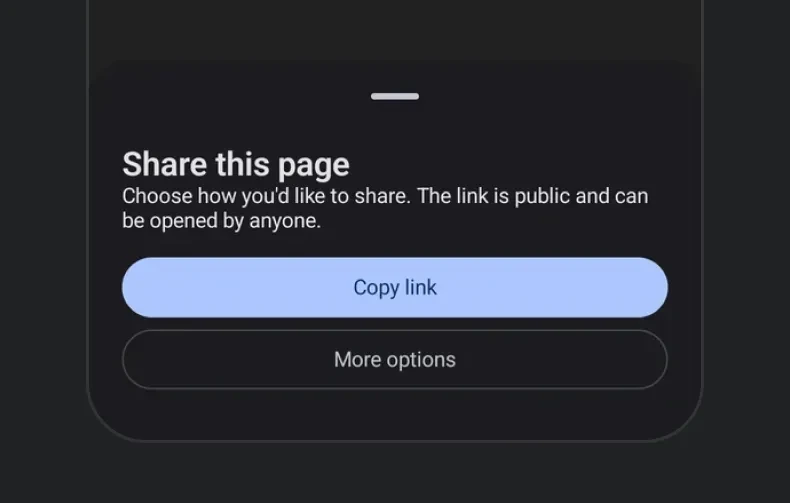
一个从屏幕底部滑出的模态底部弹出层。

Android
iOS
Web
Included in Expo Go
Bundled version:
~56.0.6

For the complete documentation index, see llms.txt. Use this file to discover all available pages.

一个从屏幕底部滑出的模态 sheet。sheet 的可见性是受控的——通过 React state 切换 isPresented,并通过 onDismiss 将其关闭(当用户向下滑动或点击遮罩层时触发)。

安装

Terminal
npx expo install @expo/ui

If you are installing this in an existing React Native app, make sure to install expo in your project.

用法

基础底部 sheet

BottomSheetExample.tsx
import { useState } from 'react'; import { Host, Column, Button, BottomSheet, Text } from '@expo/ui'; export default function BottomSheetExample() { const [isPresented, setIsPresented] = useState(false); return ( <Host style={{ flex: 1 }}> <Button label="打开 sheet" onPress={() => setIsPresented(true)} /> <BottomSheet isPresented={isPresented} onDismiss={() => setIsPresented(false)}> <Column spacing={12}> <Text textStyle={{ fontSize: 18, fontWeight: '700' }}>sheet 内容</Text> <Text>向下拖动或点击遮罩层即可关闭。</Text> <Button label="关闭" onPress={() => setIsPresented(false)} /> </Column> </BottomSheet> </Host> ); }

隐藏拖拽指示器

对于没有把手的 sheet,传入 showDragIndicator={false}

BottomSheetNoIndicatorExample.tsx
import { useState } from 'react'; import { Host, Button, BottomSheet, Text } from '@expo/ui'; export default function BottomSheetNoIndicatorExample() { const [isPresented, setIsPresented] = useState(false); return ( <Host style={{ flex: 1 }}> <Button label="打开" onPress={() => setIsPresented(true)} /> <BottomSheet isPresented={isPresented} onDismiss={() => setIsPresented(false)} showDragIndicator={false}> <Text>没有拖拽把手。</Text> </BottomSheet> </Host> ); }

Snap 点

传入 snapPoints 以便用户在多个停靠高度之间拖动 sheet。为实现跨平台一致性,你可以使用语义值 'half''full'{ fraction }{ height } 形式在 iOS 和 web 上会被精确遵循。

当 sheet 内容可能比最小的 snap 点更高时,请将其包裹在 ScrollView 中,这样溢出内容才能正确滚动。

BottomSheetSnapPointsExample.tsx
import { useState } from 'react'; import { Host, BottomSheet, Button, Column, ScrollView, Text } from '@expo/ui'; export default function BottomSheetSnapPointsExample() { const [isPresented, setIsPresented] = useState(false); return ( <Host style={{ flex: 1 }}> <Button label="Open" onPress={() => setIsPresented(true)} /> <BottomSheet isPresented={isPresented} onDismiss={() => setIsPresented(false)} snapPoints={['half', 'full']}> <ScrollView> <Column spacing={12}> <Text textStyle={{ fontSize: 20, fontWeight: '700' }}>Half / full sheet</Text> <Text>在半屏和全屏高度之间拖动 sheet。</Text> </Column> </ScrollView> </BottomSheet> </Host> ); }

在 Android 上,{ fraction }{ height } 会自动对齐到最接近的 'half' / 'full'——底层的 ModalBottomSheet 只支持两个停靠状态。部分状态仅在内容足够高、超过 Material 的部分阈值时才会显示;如果你需要在短内容上显示半屏状态,请为内容设置显式高度或让其填充可用空间。

API

import { BottomSheet } from '@expo/ui';

Component

BottomSheet

Android
iOS
Web

Type: React.Element<BottomSheetProps>

A modal sheet that slides up from the bottom of the screen.

Props for the BottomSheet component, a modal sheet that slides up from the bottom of the screen.

BottomSheetProps

children

Android
iOS
Web
Optional • Type: ReactNode

Content to render inside the bottom sheet.

isPresented

Android
iOS
Web
Type: boolean

Whether the bottom sheet is currently visible.

modifiers

Android
iOS
Web
Optional • Type: ModifierConfig[]

Platform-specific modifier escape hatch. Pass an array of modifier configs from @expo/ui/swift-ui/modifiers or @expo/ui/jetpack-compose/modifiers.

onDismiss

Android
iOS
Web
Type: () => void

Called when the bottom sheet is dismissed by the user (e.g. swiping down or tapping the overlay).

showDragIndicator

Android
iOS
Web
Optional • Type: boolean • Default: true

Whether to show a drag indicator at the top of the sheet.

snapPoints

Android
iOS
Web
Optional • Type: SnapPoint[]

Heights the sheet can rest at. When omitted, the sheet auto-sizes to its content. See SnapPoint for the supported values.

Example

``['half', 'full'] — draggable between half and full

Example

``['full'] — always full height

testID

Android
iOS
Web
Optional • Type: string

Identifier used to locate the component in end-to-end tests.

Types

SnapPoint

Android
iOS
Web

A snap point describing one of the heights a BottomSheet can rest at.

  • 'half' — Approximately half-screen.
  • 'full' — Fully expanded.
  • { fraction } — A fraction of the screen height (0–1). iOS / web only.
  • { height } — A fixed pixel height. iOS / web only.

On Android, { fraction } and { height } snap to the nearest of 'half' / 'full'. See the component docs for platform behavior notes.

Type: 'half' or 'full' or object shaped as below:

PropertyTypeDescription
fractionnumber
-

Or object shaped as below:

PropertyTypeDescription
heightnumber
-