import{Host,TextField,Text,
useNativeState,}from'@expo/ui/jetpack-compose';exportdefaultfunctionUncontrolledTextFieldExample(){const text =useNativeState('');return(<HostmatchContents><TextFieldvalue={text}><TextField.Label><Text>用户名</Text></TextField.Label></TextField></Host>);}
受控文本框
将 useNativeState 可观察对象作为 value 传入,并使用一个 onValueChange worklet 在写回之前转换或校验输入。下面的示例会在输入时将文本转为大写。
import{Host,TextField,Text,
useNativeState,}from'@expo/ui/jetpack-compose';import{ useCallback }from'react';exportdefaultfunctionControlledTextFieldExample(){const text =useNativeState('');const handleValueChange =useCallback((value:string)=>{'worklet';
text.value= value.toUpperCase();},[text]);return(<HostmatchContents><TextFieldvalue={text}onValueChange={handleValueChange}><TextField.Label><Text>姓名</Text></TextField.Label></TextField></Host>);}
描边式文本框
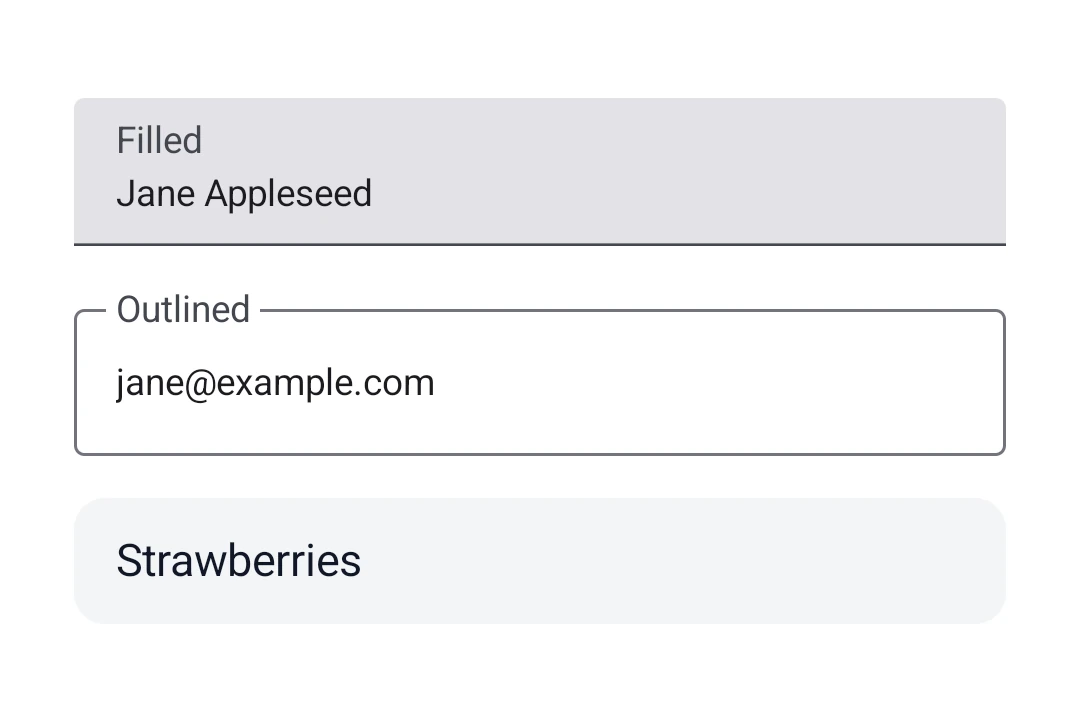
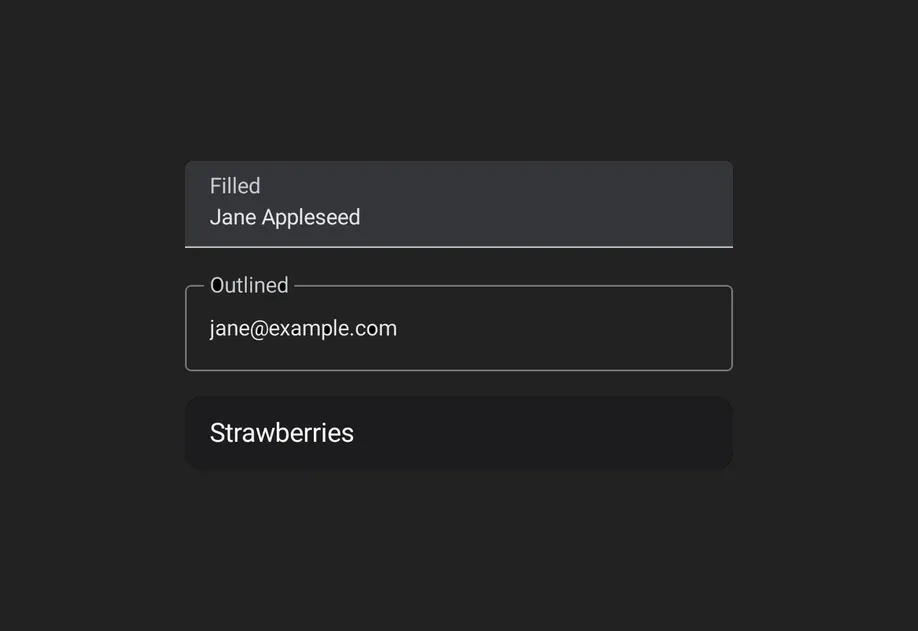
当你想要带边框轮廓而不是填充背景的文本框时,请使用 OutlinedTextField。
OutlinedTextFieldExample.tsx
import{Host,OutlinedTextField,Text,
useNativeState,}from'@expo/ui/jetpack-compose';exportdefaultfunctionOutlinedTextFieldExample(){const text =useNativeState('');return(<HostmatchContents><OutlinedTextFieldvalue={text}><OutlinedTextField.Label><Text>邮箱</Text></OutlinedTextField.Label><OutlinedTextField.Placeholder><Text>[email protected]</Text></OutlinedTextField.Placeholder></OutlinedTextField></Host>);}
import{Host,TextField,Text,
useNativeState,}from'@expo/ui/jetpack-compose';exportdefaultfunctionTextFieldSlotsExample(){const text =useNativeState('');return(<HostmatchContents><TextFieldvalue={text}><TextField.Label><Text>价格</Text></TextField.Label><TextField.Placeholder><Text>0.00</Text></TextField.Placeholder><TextField.LeadingIcon><Text>💰</Text></TextField.LeadingIcon><TextField.Prefix><Text>$</Text></TextField.Prefix><TextField.Suffix><Text>USD</Text></TextField.Suffix><TextField.SupportingText><Text>输入金额</Text></TextField.SupportingText></TextField></Host>);}
键盘选项
使用 keyboardOptions 属性来配置键盘类型、首字母大写、自动更正和 IME 操作。
KeyboardOptionsExample.tsx
import{Host,TextField,Text,
useNativeState,}from'@expo/ui/jetpack-compose';exportdefaultfunctionKeyboardOptionsExample(){const text =useNativeState('');return(<HostmatchContents><TextFieldvalue={text}singleLinekeyboardOptions={{
keyboardType:'email',
capitalization:'none',
autoCorrectEnabled:false,
imeAction:'done',}}><TextField.Label><Text>邮箱</Text></TextField.Label></TextField></Host>);}
键盘操作
使用 keyboardActions 属性来处理 IME 操作按钮的按下。触发的回调取决于 keyboardOptions 中设置的 imeAction。每个回调都会接收当前文本值。
KeyboardActionsExample.tsx
import{Host,TextField,Text,
useNativeState,}from'@expo/ui/jetpack-compose';exportdefaultfunctionKeyboardActionsExample(){const text =useNativeState('');return(<HostmatchContents><TextFieldvalue={text}singleLinekeyboardOptions={{ imeAction:'search'}}keyboardActions={{onSearch: value =>console.log('已搜索:', value),}}><TextField.Label><Text>搜索</Text></TextField.Label></TextField></Host>);}
A bare, unstyled Compose BasicTextField with no Material decoration.
Props for BasicTextField. Mirrors Compose's BasicTextField: a bare,
unstyled text field with no Material chrome (no container, indicator, or
built-in padding). Shares CommonTextFieldProperties with TextField and
OutlinedTextField; use BasicTextField.DecorationBox to add your own
decoration.
Color of the text cursor. Maps to Compose's cursorBrush via
SolidColor(color). Defaults to the theme's primary color
(MaterialTheme.colorScheme.primary) so it stays visible in light and dark.
A Material3 OutlinedTextField with a transparent background and border outline.
Props shared by every Compose text field variant — TextField,
OutlinedTextField, and BasicTextField. The Material variants add their
own decoration props (isError, shape, colors, slot children);
BasicTextField adds cursorColor.
Shape used for the field's container outline/fill. Use the helpers from
Shape (for example, <Shape.Pill /> or <Shape.RoundedCorner cornerRadii={...} />).
Defaults to the Material OutlinedTextFieldDefaults.shape/TextFieldDefaults.shape.
Props shared by every Compose text field variant — TextField,
OutlinedTextField, and BasicTextField. The Material variants add their
own decoration props (isError, shape, colors, slot children);
BasicTextField adds cursorColor.
Shape used for the field's container outline/fill. Use the helpers from
Shape (for example, <Shape.Pill /> or <Shape.RoundedCorner cornerRadii={...} />).
Defaults to the Material OutlinedTextFieldDefaults.shape/TextFieldDefaults.shape.
Imperative methods for BasicTextField. Identical to TextFieldRef.
CommonTextFieldProperties
Android
Props shared by every Compose text field variant — TextField,
OutlinedTextField, and BasicTextField. The Material variants add their
own decoration props (isError, shape, colors, slot children);
BasicTextField adds cursorColor.
Property
Type
Description
autoFocus(optional)
boolean
If true, the text field will be focused automatically when mounted.
Maximum number of characters allowed. Truncates natively as the user types.
maxLines(optional)
number
-
minLines(optional)
number
-
modifiers(optional)
ModifierConfig[]
-
onFocusChanged(optional)
(focused: boolean) => void
A callback triggered when the field gains or loses focus.
onSelectionChange(optional)
(selection:{
end: number,
start: number
}) => void
Called when the selection range changes.
onValueChange(optional)
(value: string) => void
Fires whenever the text value changes. If marked with the 'worklet'
directive, runs synchronously on the UI thread; otherwise delivered
asynchronously as a regular JS event. Use onSelectionChange (or read
the selection observable) to react to selection-only changes.
Observable state holding the current selection range. Create with
useNativeState({ start: 0, end: 0 }). The field writes user-driven
changes back to it, and writes from JS (or a worklet) update the
cursor/selection in the field. Use ref.setSelection(start, end) for
imperative one-shot updates.
Selection-related colors. Maps to Compose's TextSelectionColors via
LocalTextSelectionColors. handleColor controls the drag handles (and
the caret's drag handle); backgroundColor is the highlighted-text
background (typically the same tint at lower alpha so the underlying text
stays readable). Independent of cursorColor, which tints the caret line.
Text styling for the field's content. Maps to Compose's TextStyle.
value(optional)
ObservableState<string>
An observable state that holds the current text value. Create one with
useNativeState('initial text'). If omitted, the field manages its own
internal state.
visualTransformation(optional)
'password' | 'none'
Display-time text transformation. 'password' masks every character;
'none' (default) leaves the buffer as-is.
ObservableState
Android
Observable state shared between JavaScript and native views (Jetpack Compose
on Android and SwiftUI on iOS).
A single listener invoked on the native UI runtime whenever the value changes
(after iOS didSet and Android's setter). Assigning replaces the previous
listener; assign null to clear. The initial value does not fire onChange.
The callback must be a worklet so it can run synchronously on the UI thread.
Attach it inside useEffect and clear it in the cleanup so the listener
lifecycle matches the component lifecycle.
Example
const state =useNativeState(0);useEffect(()=>{
state.onChange=(value)=>{'worklet';console.log('changed to', value);};},[]);
value
T
The current value.
Writes from a UI worklet are synchronous and immediately readable. Writes
from the JS thread are scheduled to the UI thread asynchronously, the new value is not readable until the update has been
applied. Prefer writing from a worklet when you need synchronous updates
get
() => T
Reads the current value. A React Compiler compliant alternative to reading .value
set
(value: T) => void
Writes a new value. A React Compiler-compliant alternative to assigning .value