Reference version

This is documentation for the next SDK version. For up-to-date documentation, see the latest version (SDK 55).

列表

一个用于显示可滚动项目列表的 SwiftUI List 组件。

iOS
tvOS

For the complete documentation index, see llms.txt. Use this Use this file to discover all available pages.

Expo UI List 与官方 SwiftUI List API 保持一致,并支持通过 listStyle 修饰符、各种行/分区修饰符,以及选择、重新排序和编辑功能进行样式设置。

安装

Terminal
npx expo install @expo/ui

If you are installing this in an existing React Native app, make sure to install expo in your project.

用法

基础列表

BasicListExample.tsx
import { Host, List, Text, Section } from '@expo/ui/swift-ui'; export default function BasicListExample() { return ( <Host style={{ flex: 1 }}> <List> <Section title="水果"> <Text>苹果</Text> <Text>香蕉</Text> <Text>橙子</Text> </Section> <Section title="蔬菜"> <Text>胡萝卜</Text> <Text>西兰花</Text> <Text>菠菜</Text> </Section> </List> </Host> ); }

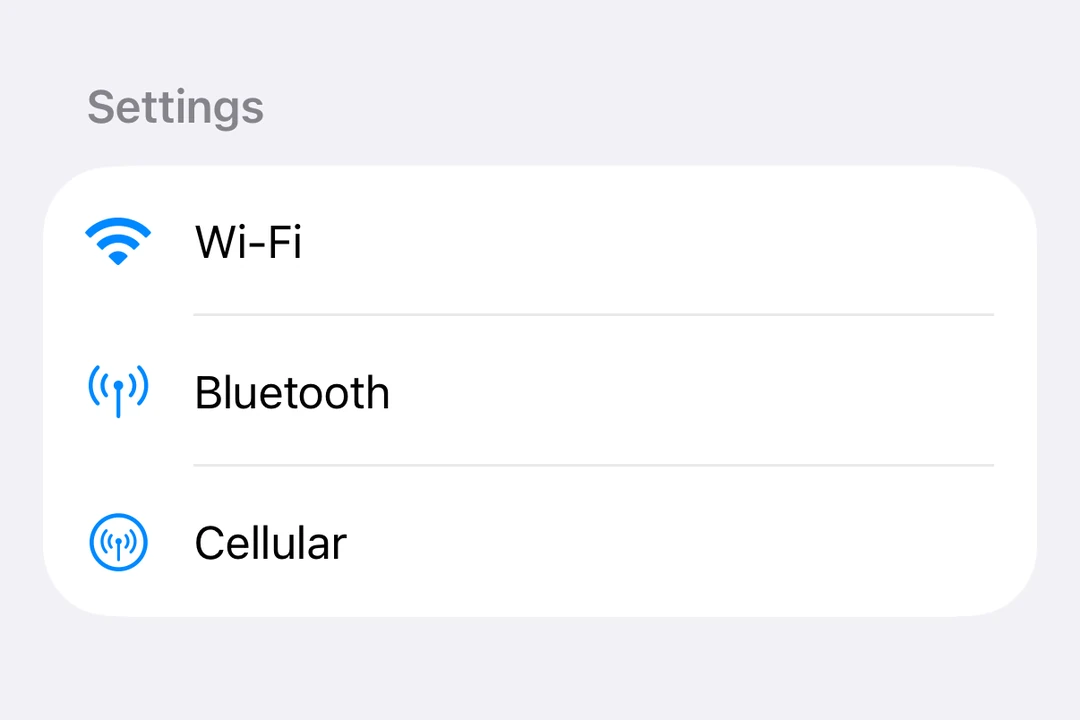
带有标签和图标的列表

ListWithLabelsExample.tsx
import { Host, List, Label, Section } from '@expo/ui/swift-ui'; export default function ListWithLabelsExample() { return ( <Host style={{ flex: 1 }}> <List> <Section title="设置"> <Label title="Wi-Fi" systemImage="wifi" /> <Label title="蓝牙" systemImage="antenna.radiowaves.left.and.right" /> <Label title="蜂窝网络" systemImage="antenna.radiowaves.left.and.right.circle" /> </Section> </List> </Host> ); }

列表样式

使用 listStyle 修饰符来更改列表的外观。

注意: insetinsetGroupedsidebar 样式在 tvOS 上不可用。

ListStylesExample.tsx
import { useState } from 'react'; import { Host, List, Text, Section, Picker } from '@expo/ui/swift-ui'; import { listStyle, pickerStyle, tag } from '@expo/ui/swift-ui/modifiers'; const styles = ['automatic', 'plain', 'inset', 'insetGrouped', 'grouped', 'sidebar'] as const; export default function ListStylesExample() { const [styleIndex, setStyleIndex] = useState(0); return ( <Host style={{ flex: 1 }}> <List modifiers={[listStyle(styles[styleIndex])]}> <Section title="样式选择器"> <Picker label="列表样式" selection={styleIndex} onSelectionChange={setStyleIndex} modifiers={[pickerStyle('menu')]}> {styles.map((style, index) => ( <Text key={style} modifiers={[tag(index)]}> {style} </Text> ))} </Picker> </Section> <Section title="示例项目"> <Text>项目 1</Text> <Text>项目 2</Text> <Text>项目 3</Text> </Section> </List> </Host> ); }

选择和编辑模式

使用带有 onDeleteonMove 属性的 List.ForEach 复合组件,可启用列表项的选择、删除和重新排序。

EditableListExample.tsx
import { useState } from 'react'; import { Host, List, Label, Section, Button, Toggle } from '@expo/ui/swift-ui'; import { environment, tag } from '@expo/ui/swift-ui/modifiers'; type Task = { id: string; title: string }; const INITIAL_TASKS: Task[] = [ { id: '1', title: '任务 1' }, { id: '2', title: '任务 2' }, { id: '3', title: '任务 3' }, { id: '4', title: '任务 4' }, ]; export default function EditableListExample() { const [tasks, setTasks] = useState<Task[]>(INITIAL_TASKS); const [selectedIds, setSelectedIds] = useState<string[]>([]); const [editMode, setEditMode] = useState(false); const handleDelete = (indices: number[]) => { setTasks(prev => prev.filter((_, i) => !indices.includes(i))); }; const handleMove = (sourceIndices: number[], destination: number) => { setTasks(prev => { const newTasks = [...prev]; const [removed] = newTasks.splice(sourceIndices[0], 1); const adjustedDest = sourceIndices[0] < destination ? destination - 1 : destination; newTasks.splice(adjustedDest, 0, removed); return newTasks; }); }; return ( <Host style={{ flex: 1 }}> <List selection={selectedIds} onSelectionChange={ids => setSelectedIds(ids.map(String))} modifiers={[environment('editMode', editMode ? 'active' : 'inactive')]}> <Section title="设置"> <Toggle label="编辑模式" isOn={editMode} onIsOnChange={setEditMode} /> </Section> <Section title="任务"> <List.ForEach onDelete={handleDelete} onMove={handleMove}> {tasks.map(task => ( <Label key={task.id} title={task.title} modifiers={[tag(task.id)]} /> ))} </List.ForEach> </Section> </List> </Host> ); }

下拉刷新

使用 refreshable 修饰符启用下拉刷新功能。

RefreshableListExample.tsx
import { useState } from 'react'; import { Host, List, Text, Section } from '@expo/ui/swift-ui'; import { refreshable } from '@expo/ui/swift-ui/modifiers'; export default function RefreshableListExample() { const [lastRefresh, setLastRefresh] = useState<Date | null>(null); const handleRefresh = async () => { // 模拟异步数据获取 await new Promise(resolve => setTimeout(resolve, 1500)); setLastRefresh(new Date()); }; return ( <Host style={{ flex: 1 }}> <List modifiers={[refreshable(handleRefresh)]}> <Section title="数据"> <Text>下拉以刷新</Text> {lastRefresh && <Text>上次刷新:{lastRefresh.toLocaleTimeString()}</Text>} </Section> </List> </Host> ); }

行样式

使用 listRowBackgroundlistRowSeparatorlistRowInsets 修饰符来自定义单独的行。

RowStylingExample.tsx
import { Host, List, Text, Section } from '@expo/ui/swift-ui'; import { listRowBackground, listRowSeparator, listRowInsets } from '@expo/ui/swift-ui/modifiers'; export default function RowStylingExample() { return ( <Host style={{ flex: 1 }}> <List> <Section title="已样式化的行"> <Text modifiers={[listRowBackground('blue')]}>蓝色背景</Text> <Text modifiers={[listRowSeparator('hidden')]}>隐藏分隔线</Text> <Text modifiers={[listRowInsets({ leading: 40 })]}>额外的前导内边距</Text> <Text modifiers={[listRowInsets({ leading: 0, trailing: 0 })]}>无水平内边距</Text> </Section> </List> </Host> ); }

键盘收起行为

使用 scrollDismissesKeyboard 修饰符来控制滚动时如何收起键盘。

KeyboardDismissExample.tsx
import { Host, List, Section, TextField } from '@expo/ui/swift-ui'; import { scrollDismissesKeyboard } from '@expo/ui/swift-ui/modifiers'; export default function KeyboardDismissExample() { return ( <Host style={{ flex: 1 }}> <List modifiers={[scrollDismissesKeyboard('interactively')]}> <Section title="表单"> <TextField placeholder="姓名" /> <TextField placeholder="电子邮件" /> <TextField placeholder="电话" /> </Section> </List> </Host> ); }

标题突出程度

使用 headerProminence 修饰符来调整分区标题的视觉突出程度。

HeaderProminenceExample.tsx
import { Host, List, Text, Section } from '@expo/ui/swift-ui'; import { headerProminence } from '@expo/ui/swift-ui/modifiers'; export default function HeaderProminenceExample() { return ( <Host style={{ flex: 1 }}> <List modifiers={[headerProminence('increased')]}> <Section title="重要分区"> <Text>该分区的标题突出程度更高</Text> </Section> <Section title="另一个分区"> <Text>标题更加醒目</Text> </Section> </List> </Host> ); }

API

import { List } from '@expo/ui/swift-ui';

Components

List

iOS
tvOS

Type: React.Element<ListProps>

A list component that renders its children using a native SwiftUI List.

ListProps

children

iOS
tvOS
Type: ReactNode

The children elements to be rendered inside the list.

onSelectionChange

iOS
tvOS
Optional • Type: (selection: (string | number)[]) => void

Callback triggered when the selection changes in a list. Returns an array of selected item tags.

selection

iOS
tvOS
Optional • Type: (string | number)[]

The currently selected item tags.

ListForEach

iOS
tvOS

Type: React.Element<ListForEachProps>

A compound component of List that enables item deletion and reordering. This component must be used as a child of List (as List.ForEach).

ListForEachProps

children

iOS
tvOS
Type: React.ReactNode

The children elements to be rendered inside the List.ForEach.

onDelete

iOS
tvOS
Optional • Type: (indices: number[]) => void

Callback triggered when items are deleted. Receives an array of indices that were deleted.

See: Official SwiftUI documentation.

onMove

iOS
tvOS
Optional • Type: (sourceIndices: number[], destination: number) => void

Callback triggered when items are moved. Receives the source indices and destination index.

See: Official SwiftUI documentation.