Reference version

This is documentation for the next SDK version. For up-to-date documentation, see the latest version (SDK 56).

日期选择器

一个用于选择日期和时间的 SwiftUI 日期选择器组件。

iOS
Included in Expo Go

For the complete documentation index, see llms.txt. Use this file to discover all available pages.

Expo UI DatePicker 与官方 SwiftUI DatePicker API 一致,并支持通过 datePickerStyle 修饰符进行样式设置。
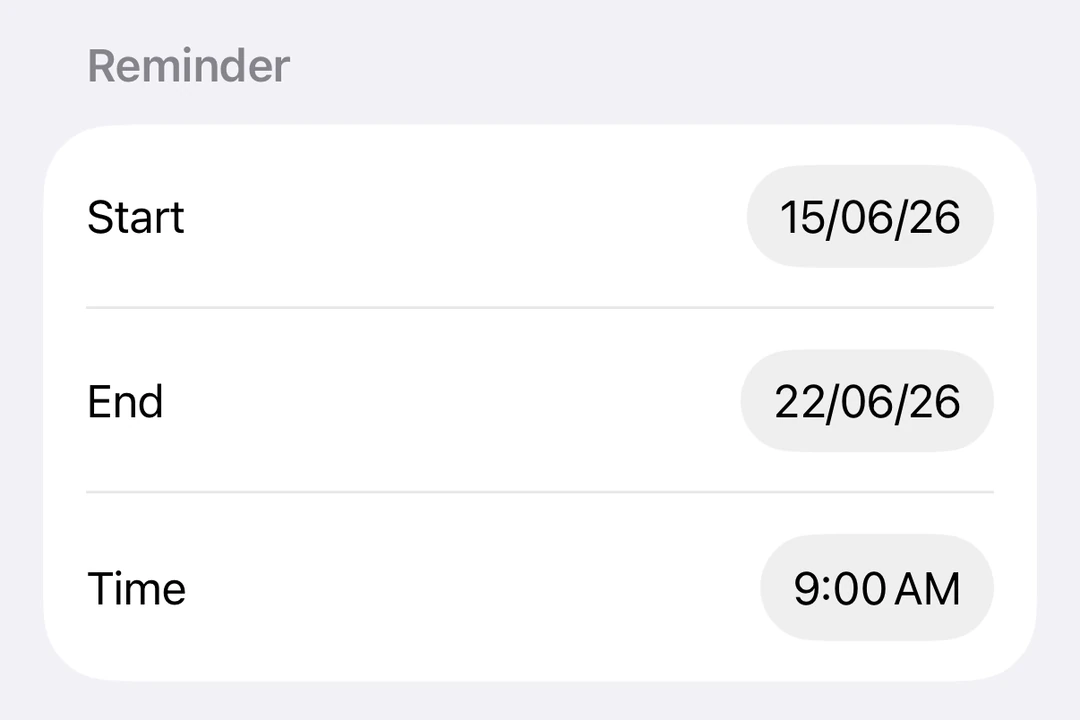
表单中的日期和时间 DatePicker 行

安装

Terminal
npx expo install @expo/ui

If you are installing this in an existing React Native app, make sure to install expo in your project.

日期选择器

DatePickerExample.tsx
import { useState } from 'react'; import { Host, DatePicker } from '@expo/ui/swift-ui'; export default function DatePickerExample() { const [selectedDate, setSelectedDate] = useState(new Date()); return ( <Host matchContents> <DatePicker title="选择日期" selection={selectedDate} displayedComponents={['date']} onDateChange={date => { setSelectedDate(date); }} /> </Host> ); }

时间选择器

TimePickerExample.tsx
import { useState } from 'react'; import { Host, DatePicker } from '@expo/ui/swift-ui'; export default function TimePickerExample() { const [selectedDate, setSelectedDate] = useState(new Date()); return ( <Host matchContents> <DatePicker title="选择时间" selection={selectedDate} displayedComponents={['hourAndMinute']} onDateChange={date => { setSelectedDate(date); }} /> </Host> ); }

日期和时间选择器

DateTimePickerExample.tsx
import { useState } from 'react'; import { Host, DatePicker } from '@expo/ui/swift-ui'; export default function DateTimePickerExample() { const [selectedDate, setSelectedDate] = useState(new Date()); return ( <Host matchContents> <DatePicker title="选择日期和时间" selection={selectedDate} displayedComponents={['date', 'hourAndMinute']} onDateChange={date => { setSelectedDate(date); }} /> </Host> ); }

带日期范围

DateRangePickerExample.tsx
import { useState } from 'react'; import { Host, DatePicker } from '@expo/ui/swift-ui'; export default function DateRangePickerExample() { const [selectedDate, setSelectedDate] = useState(new Date()); return ( <Host matchContents> <DatePicker title="选择日期" selection={selectedDate} displayedComponents={['date']} range={{ start: new Date(2024, 0, 1), end: new Date(2024, 11, 31), }} onDateChange={date => { setSelectedDate(date); }} /> </Host> ); }

使用修饰符进行样式设置

你可以使用 datePickerStyle 修饰符来更改选择器的外观。可用样式包括:automaticcompactgraphicalwheel

WheelDatePickerExample.tsx
import { useState } from 'react'; import { Host, DatePicker } from '@expo/ui/swift-ui'; import { datePickerStyle } from '@expo/ui/swift-ui/modifiers'; export default function WheelDatePickerExample() { const [selectedDate, setSelectedDate] = useState(new Date()); return ( <Host matchContents> <DatePicker modifiers={[datePickerStyle('wheel')]} title="选择日期" selection={selectedDate} displayedComponents={['date']} onDateChange={date => { setSelectedDate(date); }} /> </Host> ); }
GraphicalDatePickerExample.tsx
import { useState } from 'react'; import { Host, DatePicker } from '@expo/ui/swift-ui'; import { datePickerStyle } from '@expo/ui/swift-ui/modifiers'; export default function GraphicalDatePickerExample() { const [selectedDate, setSelectedDate] = useState(new Date()); return ( <Host matchContents> <DatePicker modifiers={[datePickerStyle('graphical')]} title="选择日期" selection={selectedDate} displayedComponents={['date']} onDateChange={date => { setSelectedDate(date); }} /> </Host> ); }

禁用的选择器

你可以使用 disabled 修饰符使选择器不可交互。

DisabledDatePickerExample.tsx
import { useState } from 'react'; import { Host, DatePicker } from '@expo/ui/swift-ui'; import { disabled } from '@expo/ui/swift-ui/modifiers'; export default function DisabledDatePickerExample() { const [selectedDate, setSelectedDate] = useState(new Date()); return ( <Host matchContents> <DatePicker title="选择日期" selection={selectedDate} displayedComponents={['date']} onDateChange={date => { setSelectedDate(date); }} modifiers={[disabled()]} /> </Host> ); }

自定义区域设置

使用带有 locale 键的 environment 修饰符,以特定区域设置显示选择器。

LocaleDatePickerExample.tsx
import { useState } from 'react'; import { Host, DatePicker } from '@expo/ui/swift-ui'; import { environment } from '@expo/ui/swift-ui/modifiers'; export default function LocaleDatePickerExample() { const [selectedDate, setSelectedDate] = useState(new Date()); return ( <Host matchContents> <DatePicker title="选择日期" selection={selectedDate} displayedComponents={['date']} onDateChange={date => { setSelectedDate(date); }} modifiers={[environment('locale', 'fr_FR')]} /> </Host> ); }

自定义时区

使用带有 timeZone 键的 environment 修饰符,以特定的 IANA 时区显示选择器。

TimeZoneDatePickerExample.tsx
import { useState } from 'react'; import { Host, DatePicker } from '@expo/ui/swift-ui'; import { environment } from '@expo/ui/swift-ui/modifiers'; export default function TimeZoneDatePickerExample() { const [selectedDate, setSelectedDate] = useState(new Date()); return ( <Host matchContents> <DatePicker title="东京时间" selection={selectedDate} displayedComponents={['date', 'hourAndMinute']} onDateChange={date => { setSelectedDate(date); }} modifiers={[environment('timeZone', 'Asia/Tokyo')]} /> </Host> ); }

API

import { DatePicker } from '@expo/ui/swift-ui';

Component

DatePicker

iOS

Type: React.Element<DatePickerProps>

Renders a SwiftUI DatePicker component.

DatePickerProps

children

iOS
Optional • Type: React.ReactNode

Children to use as a custom label.

displayedComponents

iOS
Optional • Type: DatePickerComponent[] • Default: ['date']

The components to display: 'date' and/or 'hourAndMinute'.

onDateChange

iOS
Optional • Type: (date: Date) => void

Callback when the date selection changes.

range

iOS
Optional • Type: DateRange

The selectable date range.

selection

iOS
Optional • Type: Date

The currently selected date.

title

iOS
Optional • Type: string

A title/label displayed on the picker.

Types

DatePickerComponent

iOS

Literal Type: string

Acceptable values are: 'date' | 'hourAndMinute'

DateRange

iOS
PropertyTypeDescription
end(optional)Date
-
start(optional)Date
-