Reference version

This is documentation for the next SDK version. For up-to-date documentation, see the latest version (SDK 56).

菜单

与 @react-native-menu/menu 兼容的菜单。

Android
iOS
Included in Expo Go

For the complete documentation index, see llms.txt. Use this file to discover all available pages.

一个与 @react-native-menu/menu 的 API 兼容的 MenuView 组件。支持单击(默认)和长按(shouldOpenOnLongPress)两种触发方式。

在内部,此组件封装了平台特定的 @expo/ui 基础组件:

如果你需要更底层的控制,请直接使用这些基础组件。

安装

Terminal
npx expo install @expo/ui

If you are installing this in an existing React Native app, make sure to install expo in your project.

@react-native-menu/menu 迁移

  • 将导入从 import { MenuView } from '@react-native-menu/menu' 更新为 import { MenuView } from '@expo/ui/community/menu'
  • Android 上的 action.image 与上游不同。@react-native-menu/menu 期望的是一个 drawable 资源名 字符串(例如 'ic_menu_add'),它会在 android/app/src/main/res/drawable/ 下解析该资源。这个直接替换版本 不会 解析 drawable 资源名——请改为传入 ImageSourcePropType(例如 require('@expo/material-symbols/edit.xml'))。在 iOS 上,字符串值会被当作 SF Symbol 名称接受。使用 Icon.select 同时为两个平台定义,以便未使用的一侧可以按平台被 tree-shake 掉。
  • title 仅在 iOS 上会渲染为分组标题;Android 的 Material DropdownMenu 没有 title 插槽。
  • 在 Android 上,MenuView 会用自己的 Pressable 包裹触发器以打开菜单,因此你传入的 children 上附加的 onPress/onLongPress 处理函数不会触发——外层包装会抢占该手势。请把该处理函数移到你的 onPressAction 分支逻辑中,或者如果你需要在触发器上保留单击和长按的不同动作,请使用更底层的 DropdownMenu 基础组件。
  • 命令式的 ref.show() API 仅限 Android。SwiftUI 的 Menu/ContextMenu 没有程序化打开 API,所以在 iOS 上该调用不会生效(并会有一次性的开发警告)。
  • 以下来自 @react-native-menu/menu 的属性不受支持:themeVarianthitSlopisAnchoredToRightsubtitlekeepsMenuPresentedpreferredElementSize,以及 state: 'mixed'

基本用法

MenuExample.tsx
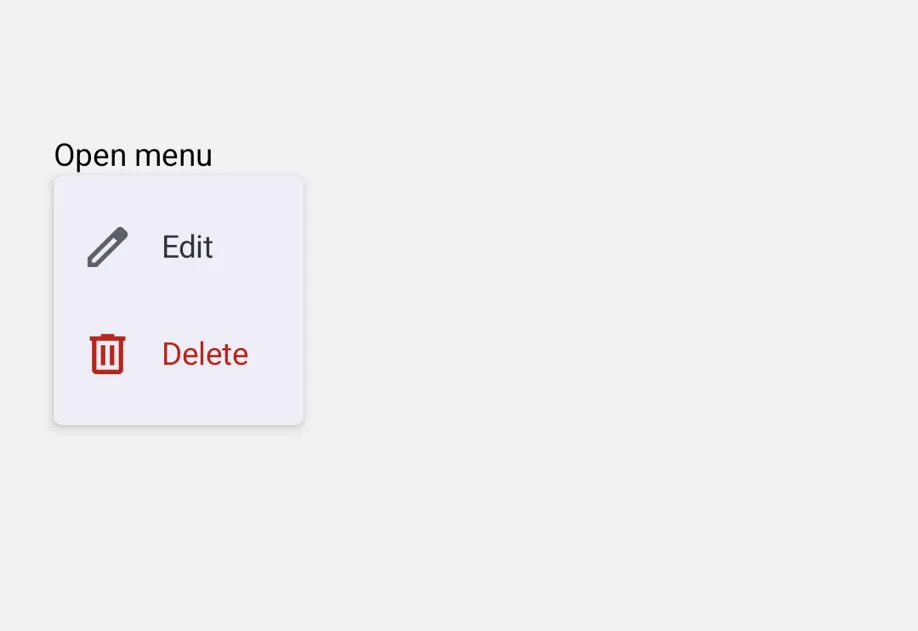
import { Icon } from '@expo/ui'; import { MenuView } from '@expo/ui/community/menu'; import { Pressable, Text } from 'react-native'; const editIcon = Icon.select({ ios: 'pencil', android: import('@expo/material-symbols/edit.xml'), }); const deleteIcon = Icon.select({ ios: 'trash', android: import('@expo/material-symbols/delete.xml'), }); export default function MenuExample() { return ( <MenuView actions={[ { id: 'edit', title: '编辑', image: editIcon }, { id: 'delete', title: '删除', image: deleteIcon, attributes: { destructive: true } }, ]} onPressAction={e => console.log(e.nativeEvent.event)}> <Pressable> <Text>打开菜单</Text> </Pressable> </MenuView> ); }

长按(上下文菜单)

设置 shouldOpenOnLongPress 可将其渲染为上下文菜单。在 Android 上,同一个受控的 DropdownMenu 会通过 PressableonLongPress 而不是 onPress 打开。在 iOS 上,这会使用 SwiftUI 的 ContextMenu,并将触发器显示为模糊预览。

LongPressMenuExample.tsx
import { Icon } from '@expo/ui'; import { MenuView } from '@expo/ui/community/menu'; import { Pressable, Text } from 'react-native'; const copyIcon = Icon.select({ ios: 'doc.on.doc', android: import('@expo/material-symbols/content_copy.xml'), }); const shareIcon = Icon.select({ ios: 'square.and.arrow.up', android: import('@expo/material-symbols/share.xml'), }); export default function LongPressMenuExample() { return ( <MenuView shouldOpenOnLongPress actions={[ { id: 'copy', title: '复制', image: copyIcon }, { id: 'share', title: '分享', image: shareIcon }, ]} onPressAction={e => console.log(e.nativeEvent.event)}> <Pressable> <Text>长按我</Text> </Pressable> </MenuView> ); }

子菜单和内联分组

subactions 默认会将嵌套操作渲染为子菜单。将父项上的 displayInline: true 可改为将子项作为内联分组渲染,这对于分组很有用。在 Android 上,只会显示分隔线(Material 的 DropdownMenu 没有 section 基础组件)。在 iOS 上,父项的 title 会变成分组标题。

SubmenuExample.tsx
import { MenuView } from '@expo/ui/community/menu'; import { Pressable, Text } from 'react-native'; export default function SubmenuExample() { return ( <MenuView actions={[ { id: 'rename', title: '重命名' }, { id: 'sort', title: '排序方式', subactions: [ { id: 'sort-name', title: '名称' }, { id: 'sort-date', title: '日期' }, { id: 'sort-size', title: '大小' }, ], }, { id: 'share-section', title: '分享', displayInline: true, subactions: [ { id: 'share-airdrop', title: 'AirDrop' }, { id: 'share-message', title: '信息' }, ], }, ]} onPressAction={e => console.log(e.nativeEvent.event)}> <Pressable> <Text>打开菜单</Text> </Pressable> </MenuView> ); }

带勾选标记的切换项

state 设置为 'on''off',即可将操作渲染为可切换项;当为 on 时会在前面显示勾选标记。选择该操作会触发 onPressAction,由调用方负责更新状态。

ToggleMenuExample.tsx
import { MenuView } from '@expo/ui/community/menu'; import { useState } from 'react'; import { Pressable, Text } from 'react-native'; export default function ToggleMenuExample() { const [pinned, setPinned] = useState(false); return ( <MenuView actions={[{ id: 'pin', title: '置顶', state: pinned ? 'on' : 'off' }]} onPressAction={e => { if (e.nativeEvent.event === 'pin') setPinned(p => !p); }}> <Pressable> <Text>{pinned ? '已置顶' : '未置顶'}</Text> </Pressable> </MenuView> ); }

API

import { MenuView } from '@expo/ui/community/menu';

Component

Android
iOS

Type: React.Element<MenuComponentProps & { ref: Ref<MenuComponentRef> }>

A drop-in replacement for @react-native-menu/menu's MenuView. Wrap any trigger view; long-pressing or tapping (per shouldOpenOnLongPress) shows a popup menu built from the actions tree.

  • On Android, renders via Compose's DropdownMenu anchored to a Pressable.
  • On iOS, renders via SwiftUI's Menu (tap) or ContextMenu (long-press).
  • On web, the trigger renders the trigger but actions do not fire; a one-time console.warn is emitted.

Props

actions

Android
iOS

The actions to display in the menu.

children

Android
iOS
Optional • Type: ReactNode

Trigger view. Long-pressing or tapping (per shouldOpenOnLongPress) opens the menu.

onCloseMenu

Android
Optional • Type: () => void

Callback invoked when the menu closes (either via dismissal or after an action fires).

On Android, fires from the controlled DropdownMenu's dismiss path. On iOS, SwiftUI Menu/ContextMenu do not expose a close hook in a way we can forward, so this is not fired there.

onOpenMenu

Android
Optional • Type: () => void

Callback invoked when the menu opens.

On Android, fires when the trigger's tap/long-press flips expanded to true. On iOS, SwiftUI Menu/ContextMenu do not expose an open hook, so this is not fired there.

onPressAction

Android
iOS
Optional • Type: (event: NativeActionEvent) => void

Callback invoked when a menu action is selected.

shouldOpenOnLongPress

Android
iOS
Optional • Type: boolean • Default: false

When true, the menu opens on long-press of the trigger instead of a single tap.

style

Android
iOS
Optional • Type: StyleProp<ViewStyle>

Style applied to the trigger wrapper.

testID

Android
iOS
Optional • Type: string

Test identifier passed through to the trigger view.

title

iOS
Optional • Type: string

Menu title shown at the top of the menu.

Types

Android
iOS

A single action inside a MenuView. Compatible with @react-native-menu/menu.

PropertyTypeDescription
attributes(optional)MenuAttributes

Visual/behavioral flags.

displayInline(optional)boolean

When true and subactions is present, renders the children as an inline section inside the parent menu (with this action's title as the section header on iOS).

id(optional)string

Identifier passed back via onPressAction.nativeEvent.event when this action is selected. Defaults to title if omitted.

image(optional)SFSymbol | ImageSourcePropType

Icon to render beside the action label.

  • When an SFSymbol name (e.g. 'trash'), rendered on iOS only. Not rendered on Android — pass an ImageSourcePropType instead to show an icon there.
  • When an ImageSourcePropType (e.g. require('./trash.xml') or { uri: '...' }), rendered on Android via Compose Icon. Ignored on iOS; SwiftUI menus only accept SF Symbol names for built-in Menu/Button labels.
imageColor(optional)ColorValue

Tint color applied to the action's icon.

Visually applied on Android via the leading Icon's tint. On iOS, the value is accepted but may not render: SwiftUI's Menu/ContextMenu draw their items via the system menu UI, which ignores per-item color modifiers.

state(optional)MenuState

Selection state. When 'on', the action renders a checkmark.

subactions(optional)MenuAction[]

Nested actions. Without displayInline, renders as a submenu; with displayInline: true, renders as an inline section.

titlestring

Action label shown in the menu.

titleColor(optional)ColorValue
Only for:
Android

Text color of the action label.

Android
iOS

Visual and behavioral attributes of a menu action. Compatible with @react-native-menu/menu.

PropertyTypeDescription
destructive(optional)boolean

Renders the action with a destructive style (red text/icon).

disabled(optional)boolean

Disables the action so it can't be activated.

hidden(optional)boolean

Hides the action from the menu.

Android
iOS

Imperative handle exposed by MenuView via ref. Compatible with @react-native-menu/menu's ref.show() API.

PropertyTypeDescription
show() => void
Only for:
Android

Programmatically open the menu.

On Android, opens the anchored DropdownMenu (equivalent to the user tapping the trigger). On iOS this is a no-op — SwiftUI Menu/ContextMenu have no programmatic open API; a one-time console.warn is emitted in development.

Android
iOS

Literal Type: string

Selection state for a menu action. 'on' renders a checkmark; 'off' doesn't.

Acceptable values are: 'on' | 'off'

NativeActionEvent

Android
iOS

Event payload delivered to onPressAction when an action is selected. Compatible with @react-native-menu/menu.

PropertyTypeDescription
nativeEvent{ event: string }
-